NGBackup 3.0: the whole fleet from one console, restores in seconds
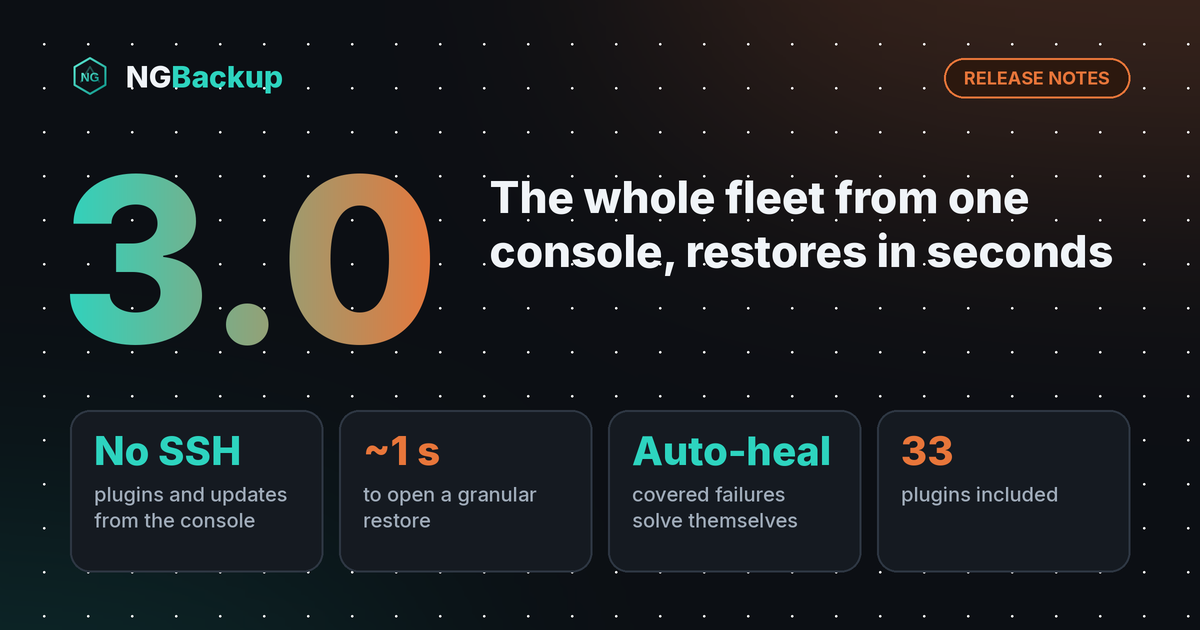
Modern enterprise backup cannot depend on someone logging into every server to update an agent, install a plugin or check a version. NGBackup 3.0 is built on that idea: the whole operation, ten machines or a thousand, run from one place, securely and without repetitive work.
This is also the first post in our Release Notes series. With every significant version, we will explain here what changed, in the language of the people who run backup and the people who buy it: what is new, what got better and what it is worth day to day. To open the series: 3.0, already in the official repository, plus a recap of the road from 1.0 to here.
3.0 in 30 seconds
Fleet without SSH
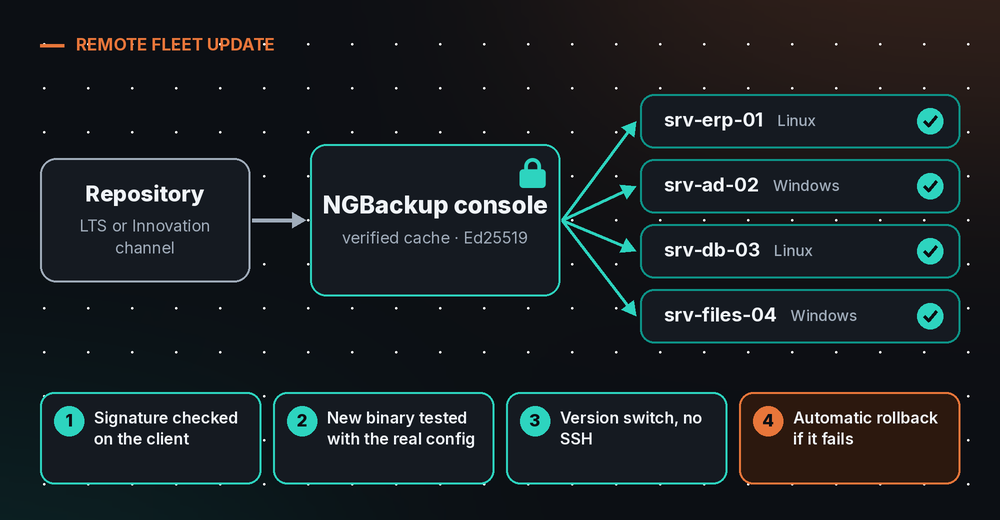
Update, restart and plugins for Linux and Windows agents from the console, over a signed channel, tested before the switch and rolled back automatically.
Deployment as code
One command installs the client and it registers itself, with no manual setup. Plus a REST API with OpenAPI to integrate everything.
Restores in seconds
A file from inside the VM in about 1 second, Instant Recovery straight from the backup and a full VM back at another site.
Parallel by default
High parallelism on from installation, growing with your hardware: a shorter backup window.
Remote diagnostics
The cat command reads source machine logs from the console, with no login and no SSH.
Auto-heal
A failure already covered by a later backup turns into G, Solved, on its own. Reports only go red when the problem is real.
Fleet management: from the terminal to the console
In environments with dozens or hundreds of protected servers, the heavy lifting is not the backup itself: it is keeping every agent updated, running the right plugins and on the same version. In 3.0 that work leaves each machine's terminal and moves into the NGBackup console.
- Inventory of the whole fleet in the console: version, platform and health of every client and storage.
- Plugin installs on remote clients through the NGBackup update channel, without opening SSH to any machine.
- Packages signed with Ed25519, checked when they enter the server cache and again on the client.
- Repository configured from the console itself, with LTS and Innovation channels, scheduled sync and import from removable media.
- Any agent's configuration read, validated and changed from the console, with version history and rollback.
What it is worth to your operation
Practicality
One console command installs a plugin or changes an agent's configuration, on Linux or Windows, without logging into the machine.
Security
No open SSH and no admin passwords going around. Only signed packages get in, from your own server's verified cache.
Time saved
Instead of one maintenance window per server, a single task for the whole fleet.
Centralization
Version inventory for every client and storage in one place, and a local repository that feeds the whole fleet.
Better management
An auditable history of every change, a choice of LTS or Innovation channel and versioned, reversible configuration.
Isolated environments
No internet access? The repository is imported from removable media and the fleet updates the same way.
Remote agent update and restart
Keeping agents updated and healthy is the kind of task that eats up nights: log into each server, stop the service, install, check. In 3.0, updating or restarting an agent, on Linux or Windows, is one console command, and NGBackup takes care of the rest.
# Update a Linux or Windows agent to the published version
update client=srv-ad-02 version=3.0.4

# Restart an agent; the server follows it until it answers again
.restart client=srv-erp-01
- Remote update of Linux and Windows agents, one at a time or the whole fleet, recorded as a job in the history with a full log.
- The new binary is tested against the real configuration before the switch. If the service does not come up, the agent rolls back to the previous version on its own.
- The update only starts when no backup is running on that agent.
- Remote restart of clients and storages: the agent acknowledges, restarts through the system's own service manager and the server follows it until it answers again. No sudo, no RDP, no SSH.
- Running backups protected: a restart respects jobs in progress, and the operator can force it when they decide it is needed.
- Change commands only go through an encrypted, authenticated session.
What it is worth to your operation
Nights back
Updating and restarting the fleet no longer needs a maintenance window per server.
No privileged access
No RDP, no SSH and no admin password for the source machines.
Automatic rollback
If the new version does not come up, the agent goes back to the previous one on its own, with nobody at the machine.
Remote diagnostics: the source machine's log on screen, without access to it
When a backup fails, the answer is usually in a log on the source machine: the database's, the application's, the agent's own. With the console's cat command, the backup administrator reads those files over NGBackup's encrypted channel, with no login, no SSH and no access request to another team.
# The last lines of the PostgreSQL log on the source machine, no SSH
.cat client=srv-db-03 file=/var/log/postgresql/postgresql-16-main.log offset=-20000- Read any client file from the console, on Linux and Windows, over the same encrypted channel as the backups.
- Read-only, available even to monitoring profiles, which can look without being able to run a backup or a restore.
- The end of the file, like a tail, or a specific range, even for logs several megabytes long.
What it is worth to your operation
No server credentials
The backup administrator needs no access to the source machines to investigate a problem.
Diagnosis in minutes
The right log on screen, with no ticket to another team and no wait for access.
Smaller attack surface
Fewer privileged accounts spread across the network, and no SSH port opened for backup.
Programmatic deployment: the client installs and registers itself
Modern infrastructure is described in code, and backup has to keep up. With NGBackup, one command installs the client and it registers itself with the server: all it needs is the server address and a name. The server creates the client's configuration, generates a unique password and keeps it sealed on both sides. Nobody edits a file, nobody opens SSH, and installing the first client or the thousandth is the same script.
# 1. Full server, with the web console
curl -fsSL https://get.ngbackup.com/install.sh | sudo bash -s -- --role server

# 2. Every client: installs, registers itself and joins the fleet
curl -fsSL https://get.ngbackup.com/install.sh | sudo bash -s -- \
    --user [email protected] --pass "$REPO_PASS" \
    --role client --director backup.empresa.com --plugins postgresql,mysql

# 3. Integrate with any system through the REST API
curl -H "Authorization: Bearer $NGB_TOKEN" https://backup.empresa.com/api/v1/openapi.json
- Automatic registration: the client introduces itself to the server, which creates its configuration and generates the credential. No manual setup, and it works even behind NAT.
- One-command installer with no prompts that sets the machine's role, plugins and cloud drivers. Ready for golden images, CI pipelines or Ansible.
- Storages register themselves too, with their write and read devices set in the same command.
- For restricted environments, token enrollment with a set lifetime and network range.
- REST API documented in OpenAPI 3.1, with personal tokens that inherit the user's role and are recorded in the audit trail.
- Configuration exported and imported as JSON, ready for version control.
What it is worth to your operation
Automatic registration
The client registers itself with the server. No configuration written by hand, no password typed.
Scale
The same command installs the first client and the thousandth, on any supported distribution.
Standardization
Every machine starts identical, with the same plugins and the same policy.
Security
A unique credential per client, kept sealed, and an API with roles and an audit record of every access.
Integration
Monitoring, ITSM and internal portals talk to backup through the documented API.
Projects become scripts
Deploying the whole fleet becomes a reviewable, repeatable, version-controlled script.
Restores in seconds, wherever you need them
When it is time to recover, what counts is how long until the file or the VM is back. 3.0 shortens that path on three fronts: the file from inside the VM, the whole VM booted straight from the backup, and the VM restored at another site.
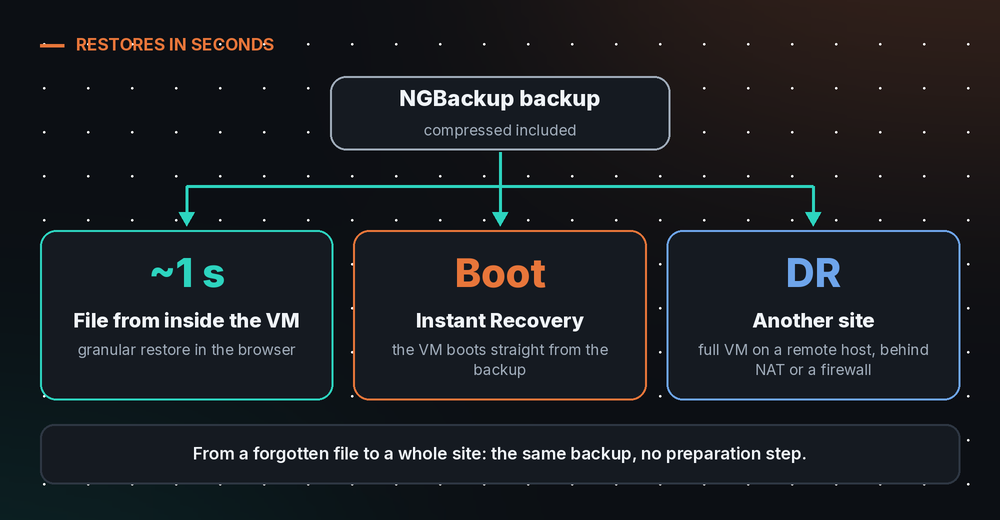
- VM granular restore that opens in about 1 second, in the browser, with the index ready as soon as the backup ends.
- Instant Recovery: the VM boots straight from the backup, compressed backups included, with no decompression step.
- Full VM restores to hosts at another site, behind NAT or a firewall.
- Multi-site environments: each site writes to and restores from its own storage.
What it means for you: the time between “I need that file” and “here it is” drops to seconds, and disaster recovery does not depend on open networking between sites.
High parallelism out of the box: a shorter backup window
What shortens the backup window is running a lot of work at the same time, and that depends on how much parallelism the platform delivers. In 3.0, NGBackup leaves installation with aggressive defaults, designed to make full use of the available hardware.
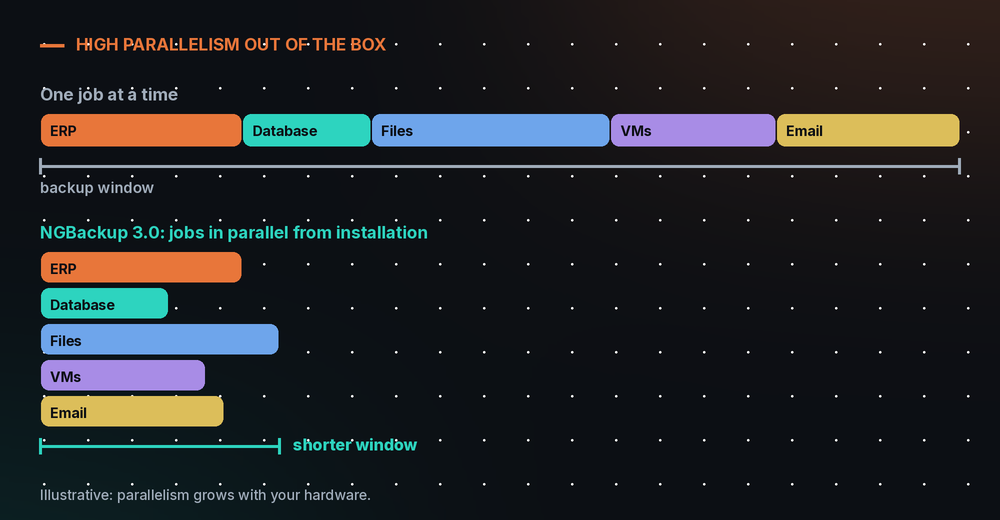
- High parallelism switched on out of the box: every client and every storage already runs many backups at once, and capacity grows with your hardware.
- A long Full does not hold up the queue: database log backups keep their schedule while the Full is still running.
- Disk storage that starts with several parallel write devices, plus devices reserved for reads, so restores and Instant Recovery do not compete with backups.
- Parallel deduplication writes: concurrent jobs write together to the same deduplicated repository.
What it means for you: the backup window shrinks right from installation, with no tuning, and keeps pace as your environment grows.
Auto-heal: red is reserved for real problems
A network blip overnight, a server rebooted mid-job: in every backup operation some job fails now and then, and the next backup already covers everything. In 3.0, NGBackup recognizes that on its own. When a backup finishes well, it reviews its own chain and marks the failures this run already covered as G, Solved.
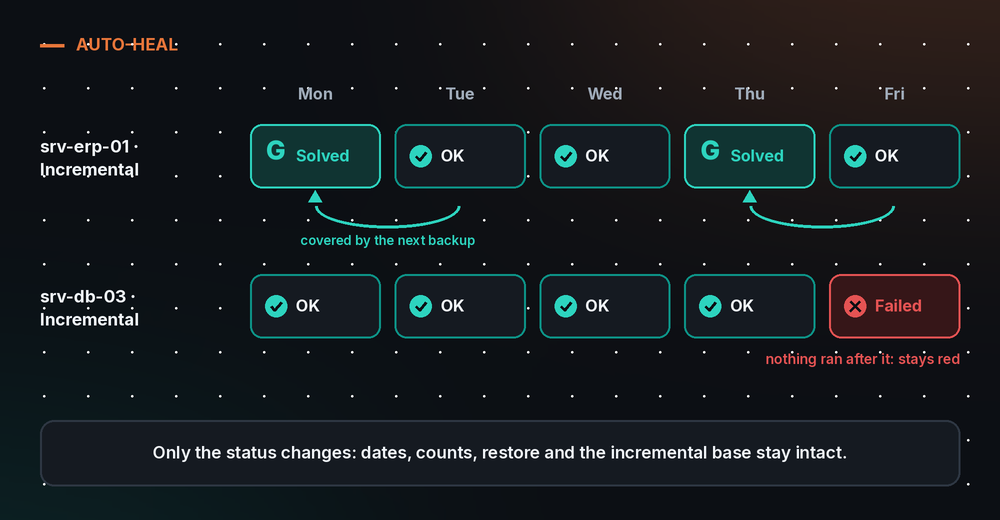
- Status G (Solved) for failures covered by a later successful backup of the same job, on the same client.
- Conservative rules: a failure becomes Solved when a later run of the same job finishes well and covers it. Until something runs after it, it stays red, and a failed Full is only solved by another successful Full.
- Full traceability: the job that solved it records in its own log which failure it covered, and the reclassification stays in the history with the reason.
- Reports, PDF, CSV and the console show solved jobs in their own category: neither red nor hidden.
- Integrity first: only the status changes. Dates, counts, the restore chain and the incremental base stay intact, proven in the lab.
- On by default, with a directive to turn it off for those who prefer the raw status.
What it means for you: the morning report shows only what needs attention, and the team stops spending time investigating failures that backup itself already solved.
Everything the platform already includes: 33 plugins, 4 clouds and certifications
3.0 arrives on top of a foundation built version after version: plugins for the workloads companies actually run, native drivers for the main clouds and integrations tested end to end. All included in the license, with no paid add-on modules.
Coverage included in the license
10 databases, with DR replication
Oracle with RMAN, SQL Server, PostgreSQL with PITR, MySQL, MariaDB and Percona, MongoDB, Firebird, Informix, ADABAS, Progress OpenEdge and SAP HANA. Oracle, MySQL and MongoDB also replicate to a disaster recovery site.
6 hypervisors: backup, replication and conversion
VMware vSphere with CBT, Hyper-V, Proxmox VE, Nutanix AHV, Apache CloudStack and Xen, agentless, with VM conversion between them (V2V).
Proxmox VE: the way out of VMware
QEMU and LXC guests, automatic cluster discovery, restore as a new VM or in place, and direct conversion of VMware VMs to Proxmox through the restore itself.
Ransomware Sentinel
Real-time active detection by entropy, mass renames and suspicious extensions, with nine response actions: snapshot, emergency backup, read-only, share blocking, process termination and alerts.
Incremental Accelerator
A real-time index of changed files removes the full tree walk on every incremental: up to 3x faster on Linux and 1.7x on Windows, measured in benchmarks.
File Replication
A 1:1 real-time replica while the backup runs, for zero-time restore, with fan-out to several sites in parallel, ACLs and attributes preserved and AES-256-GCM encryption.
Granular restore and V2V
Files from inside the VM, Instant Recovery over NBD, iSCSI, NFS or SMB and migration across hypervisors with disk and configuration conversion.
Global deduplication
At source and target, with content-defined chunking and a Bloom-filtered index, plus an encrypted protocol and self-repair.
SaaS and applications
Microsoft 365, Google Workspace with Gmail, Drive, Calendar and Contacts, Exchange, SharePoint, Active Directory and LDAP, and HCL Notes and Domino.
Agentless SFTP
Servers, NAS, switches, routers and services reachable over SFTP, with nothing installed at the source.
HPC
Lustre, GPFS, CephFS and WekaFS, integrated with Slurm and PBS, at billions-of-files scale.
4 native clouds
AWS S3 and compatibles, Azure Blob, Google Cloud Storage and Oracle Cloud Object Storage, with WORM immutability, plus OCI Compute instance backup.
Certifications and validations
Omid Cloud: WORM certified
We certified the S3 driver against Omid Cloud object storage: 13 of 13 tests, byte-for-byte integrity and WORM immutability in COMPLIANCE mode.
Oracle Cloud (OCI): validated by our team
We validated the native Object Storage driver on OCI across the Standard, Infrequent Access and Archive tiers, with WORM immutability and automatic Archive restore.
SAP HANA 2.0 SPS08: validated by our team
We validated the native Backint agent against SAP HANA 2.0 SPS08: topology, backup, catalog and recovery.
Resilience and visibility
- HTML executive email report with free space on every storage, highlighted in red below 10%.
- Open files on Windows protected through VSS, one snapshot per volume, in any system language.
- Ceph Squid compatibility.
- Every version goes through a clean-install test before it is published: install, sign in to the console, enroll a client and run a real backup.
What it means for you: updates that arrive tested, and a heads-up in your inbox before a storage fills up.
The road to 3.0
3.0 is the result of three stages. Here is what each one brought.
- 1.0
Our own core
The foundation: our own backup engine, written in Rust, a memory-safe language, with its own server, storage, client and catalog.
- TLS encryption on every data and control channel.
- Token-based client enrollment with no plaintext passwords, and secrets sealed by default.
- Global deduplication, AES encryption and compression.
- LVM, ZFS and Btrfs snapshots for consistent copies.
- Synthetic full backups, built on the storage without reading the client again.
- Granular restore and an AI assistant in the console.
- Native Windows client and the plugin suite: Oracle, SQL Server, PostgreSQL, MySQL, SAP HANA, VMware, Hyper-V, Proxmox, Nutanix, Microsoft 365 and more.
- 2.0
A unified platform
Everything a company needs to install, scale and keep copies outside the data center.
- One version for core, console, plugins and drivers.
- Signed APT and YUM repository, one-command installer and graphical Windows installer.
- Native cloud storage: AWS S3, Azure, Google Cloud Storage and Oracle Cloud, with WORM immutability through S3 Object Lock.
- Tape libraries.
- Replication and failover jobs with a defined RPO.
- FIPS mode and client agent isolation.
- Free Community edition.
- 2.x
Proven in production
The 2 line ran at customers of every size and came back with what matters day to day.
- VM granular restore that opens in about 1 second, measured in production.
- In-line compression, record by record, with no temporary file on the client. Since 3.0.8, the default compression is LZ4 — fast and light on CPU — applied automatically when a FileSet sets no
Compression. - Fleet updates through signed packages, with native Windows client updates and a single command on Linux.
- License activation with just the serial number, from the console, and a signed license file for offline backup environments, with no internet access at all.
- AI assistant integration through MCP, with role checks and an audit trail.
- Agentless Xen plugin for Citrix Hypervisor, XenServer and XCP-ng, bringing the catalog to 33 plugins.
- WORM immutability certified on Omid Cloud and the Object Storage driver validated by our team on Oracle Cloud (OCI).
- VM migration from vSphere to CloudStack through the restore itself.
- Empty-backup alarm, executive email report and deployment report in the console.
- 3.0
Operating at scale
Fleet managed without SSH, deployment as code, automatic client registration, auto-heal, restores in seconds and high parallelism out of the box.
By the numbers
Why NGBackup
Every version strengthens what already sets the platform apart:
- 33 plugins included in the license, from the mainframe to Microsoft 365, with no paid add-on modules.
- Backup, replication and conversion across hypervisors: a VMware VM can come back on Proxmox, Hyper-V, Nutanix or CloudStack.
- WORM immutability and active ransomware detection.
- Flexible licensing per agent, per TB or for MSPs, with special terms for those migrating from another solution.
- 24x7 support with a first response within 1 hour, included.
Already a customer?
3.0 is already in the official repository. Fleet clients can be updated from the console itself, and our team schedules and runs the server upgrade with you. Reach us at [email protected].
Not using NGBackup yet?
Ask for a free proof of concept in your environment and see 3.0 protecting your workloads.
Request a free proof of concept