Having backup is not the same as coming back: what November's attack wave teaches
November 2026 has been a hard month for cybersecurity in Brazil. Within a few days, public bodies and well-known companies went through leaks and attacks, and at least one of them had to rebuild systems from backup. In October, Brazil had already been the 4th country with the most disclosed ransomware victims (32 companies), according to Ransomware.live.
In cases like these, the question that matters is rarely whether there was a backup. There almost always was. The question is another one: how long until operations are back, and how sure are you that the data comes back intact?
November, in a few days
- 04/11
Brazil's National Treasury detects unauthorized access to about 30,000 user records and 4,000 Pix keys. (source: Gazeta do Povo, 13/11)
- 06/11
Caixa Vida e Previdência: an attack exposes registration data of 7.6 million current and former customers. (source: Agência Brasil, 12/11)
- 06/11
Port of Santos: an attack hits administrative systems; ten days later, recovery from backups is still in final testing. (source: Gazeta do Povo, 13/11; VTV News, 16/11)
- 11/11
Petrobras reports an attempted attack on its corporate websites, with no impact on internal systems. (source: VTV News, 13/11)
- 15/11
Inep reports attack attempts on the second day of the ENEM exam, with no harm to the tests. (source: CNN Brasil, 15/11)
- 16/11
Belo Horizonte city hall confirms an attack on its payment-slip system and asks citizens to reissue slips. (source: O Tempo, 16/11)
No organization chooses to be attacked. What you can choose is how much an attack costs, and that cost is measured mostly in downtime.
Leak, loss and downtime: three different problems
Most of November's incidents were leaks: data that left the place where it should have stayed. Others were downtime: systems offline for days. They look like the same thing, but they are different problems, and backup plays a different role in each one.
The most common attacks today do all three at once: they copy the data out, encrypt what is left and threaten to publish it. This is known as double extortion.
Leak
Confidentiality: the data was copied by someone who should not have it. Backup does not undo a leak, but the backup copy must not become the next way out.
Loss and tampering
Integrity: data deleted, encrypted or altered. Here backup is the answer, as long as there is a clean point from before the attack and it restores intact.
Downtime
Availability: systems offline. Backup only solves it if the return is fast, with an order defined and tested in advance.
The role of backup when the problem is a leak
- The copy must not leak. In NGBackup, data is encrypted with AES-256-GCM, travels over TLS on every channel, and each client has an exclusive credential, stored sealed.
- Who accesses it, and what they do, is recorded. Console with MFA, role-based access control and an audit trail of actions.
- Keep data only as long as needed. Automatic policy-based retention: old copies expire on their own instead of piling up personal data indefinitely, as required by the necessity principle of Brazil's data protection law (LGPD).
- Go back to a point before the tampering. Point-in-time recovery for databases and multiple backup generations to choose the last clean state.
- A copy the attacker cannot delete. WORM immutability: even with stolen credentials, the copy stays there until the end of retention, and double extortion loses half its power.
Having backup, restoring and coming back fast are three different steps
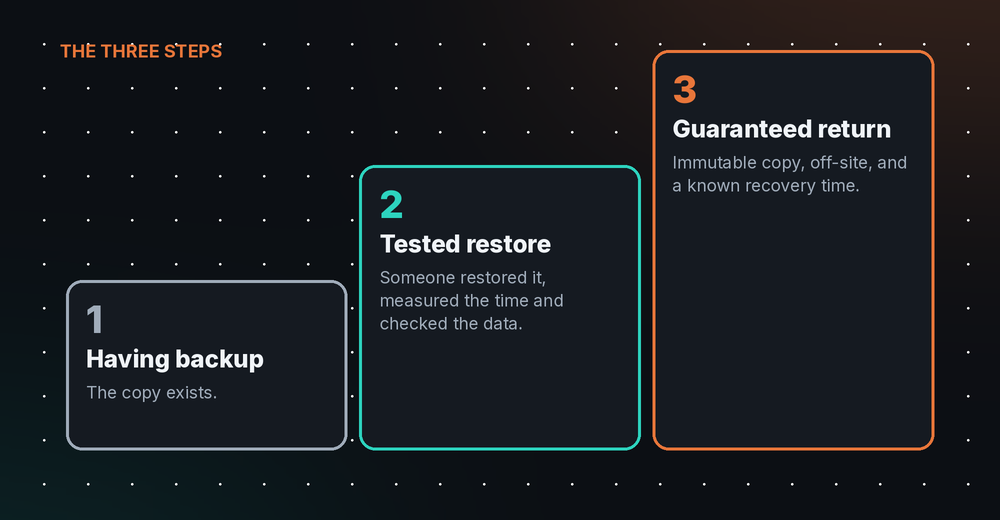
Having backup is the first step: the copy exists. It is the bare minimum, and it is where many companies stop.
Tested restore is the second: someone has already brought that backup back, measured how long it took and checked that the data is complete.
Guaranteed return is the third: the attacker cannot delete or encrypt the copy, there is a copy outside the attacked environment, and the recovery time of each system is known and fits what the business can afford.
RPO and RTO: the two numbers that define a backup
Every serious conversation about backup ends in two numbers. The first says how much data you are willing to lose. The second says how long you are willing to be down. Without them, “we have backup” does not mean much.
Both change from system to system. The ERP that bills customers and the marketing file server do not have the same value per hour, and the backup plan should reflect that.
How much data you are willing to lose
Recovery Point Objective: the gap between the last recoverable point and the moment of the incident. A daily backup at night means an RPO of up to 24 hours. A database with transaction logs copied every 15 minutes has a 15-minute RPO.
How long you are willing to be down
Recovery Time Objective: the time between the incident and the system being back up and running. It includes finding the backup, preparing the environment, restoring, checking the data and releasing the users.
In practice: a short RPO is solved with more frequent backups and transaction logs. A short RTO is solved with something else: fast restores, an environment ready to receive the data, a defined recovery order and, above all, testing.
The 3-2-1 rule, and its version for the ransomware era
The 3-2-1 rule is the foundation of any backup strategy: three copies of the data, on two different types of media or storage, with one copy offsite, away from the main location. It was created to protect against disk failure, fire and human error, and it still holds.
Ransomware added a problem the original rule did not foresee: an attacker who gets into the network looks for the backups first and tries to delete them before encrypting the rest. That is why the market started talking about 3-2-1-1-0.
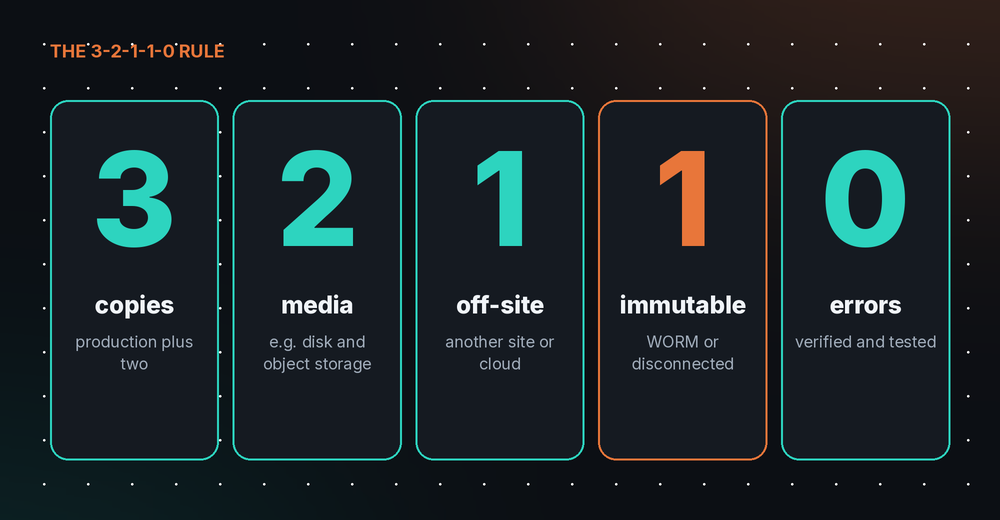
- 3 copies: production plus two backup copies, so that losing one is not the end.
- 2 different media: for example, local disk for fast restores and object storage or tape for longer retention.
- 1 offsite: at another site, in another city or in the cloud, away from the same fire, the same flood and the same network.
- 1 immutable or disconnected: a copy that nobody can delete or change until the end of retention, not even with the administrator password. Object storage with WORM (Object Lock) or an offline copy fills this role.
- 0 errors: verified backups and tested restores, with the results recorded. A copy that has never been restored is a hope, not a guarantee.
Why backups fail when it is time to come back
The problem is almost never that there is no backup. The most common causes show up exactly when a restore is needed:
- The copies were deleted before the attack. With the backup administrator password, the attacker removes the copies and only then encrypts production. Without an immutable copy, nothing is left.
- The backup server was in the same domain. If Active Directory falls into the attacker's hands, everything that trusts it falls too, including the backup.
- The backup was failing silently. Jobs that “finish with warnings” for weeks, disks that filled up, a new server that never made it into the policy.
- A piece was missing. The database was protected, but the application configuration was not. The VM came back, but the certificate, the license or the integration file did not.
- The restore is too slow. Restoring tens of terabytes from slow media over a narrow link can take days. That is where the RTO blows up.
- The recovery order was not defined. Without identity (AD, DNS) and the network up, applications do not start, and the team loses hours discovering dependencies in the middle of the crisis.
- Nobody had ever tested it. The first restore test happens on the worst possible day, with the business stopped and everyone watching.
Reference architectures
There is no single architecture, but three designs cover most companies and public bodies. All of them follow 3-2-1-1-0; what changes is the scale.
Mid-sized company, one site
For organizations with a data center or a server room that want to move away from “backup on the same storage”.
- dedicated backup server, outside the domain, with its own credentials and MFA;
- local disk storage for fast restores (the last few weeks);
- daily copy to cloud object storage with WORM immutability (the last few months);
- native plugins for the databases and agentless VM backup;
- monthly restore test of a chosen system, with the time recorded.
Low cost, a short RTO for common incidents and a copy that survives the worst-case scenario.
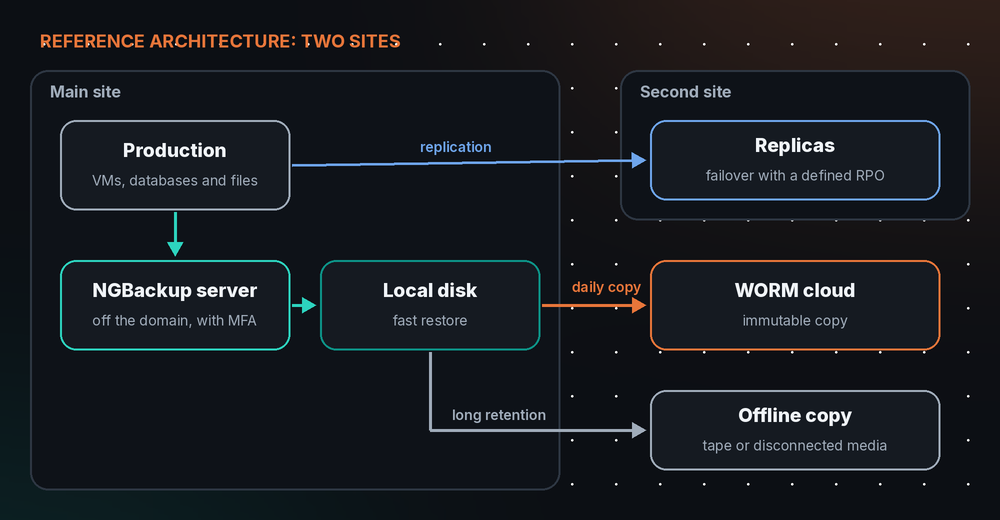
Company with two sites
For organizations with a main site and a second location, owned or in colocation.
- local backup at the main site, for fast restores;
- replication of critical VMs and databases to the second site, with a defined RPO, for failover;
- immutable copy on object storage, in the cloud or at the second site;
- offline copy (tape or disconnected media) for long retention and for the total-compromise scenario;
- rehearsed failover runbook, with recovery order and owners.
The common incident is solved at the main site; the disaster is solved at the second site; ransomware is solved with the immutable copy.
Public sector and regulated environments
For public bodies and companies with sovereignty, audit and long-retention requirements.
- software and data under the organization's control, on storage in Brazil or on-premises;
- immutability for long-term copies and an audit trail of who accessed what;
- segregation of duties: whoever administers backup does not administer production;
- periodic reports on coverage and restore tests, for internal control and audits;
- procurement through the paths set by Brazil's public procurement law, Lei 14.133, with specialized support.
Besides coming back fast, you need to prove that the backup exists, is intact and has been tested.
Hardening the backup itself
Since backup is the first target of anyone trying to extort you, it needs more protection than production, not less:
- Own credentials and MFA. Backup does not use production domain accounts, and every administrative access requires a second factor.
- Outside the domain. The backup server does not depend on the Active Directory it protects.
- Separate network. Backup traffic runs over its own network or VLAN, with the minimum number of open ports.
- Immutability on critical copies. At least one copy on WORM, which not even an administrator can delete before the deadline.
- Encryption in transit and at rest. A stolen copy must not turn into a leak.
- Alerts for anything unusual. Volume deletions, retention changes, repeated failures and mass encryption on protected servers must trigger an alert right away.
- Least privilege. Each person and each system gets only the access it needs, with a record of what it did.
The recovery order: a restore runbook
On the day of the incident, the worst time to decide the order of things is that very moment. A simple runbook, agreed in advance, saves a lot of time:
- 1
Isolate
Disconnect what was hit, preserve evidence and stop the problem from spreading, including to the backup.
- 2
Assess
Find out what was affected, since when, and which is the last clean restore point.
- 3
Prepare a clean environment
Restore on an isolated network, with systems reinstalled or verified, so you do not bring the attacker back along with the data.
- 4
Identity and network
Active Directory, DNS, DHCP and the network core first. Without them, almost nothing comes up.
- 5
Databases
The databases behind the critical applications, at the chosen point in time, with integrity checked.
- 6
Critical applications
ERP, billing, customer service: in the priority order agreed with the business.
- 7
Files and the rest
File servers, email and support systems, which can often come back gradually.
- 8
Validate and release
Check the data with the owners of each area, release the users and record the time of each step for the next test.
How often to test
- Every month: restore a chosen system in a separate environment, with the time measured.
- Every quarter: restore a critical system end to end, including database and application.
- Every year: a full disaster drill, following the runbook above, with the business areas taking part.
- Whenever something big changes: a storage migration, a new critical system or an architecture change.
Eight questions to ask your team today
If any answer is “I don't know”, that is where to start.
Is there an immutable copy?
WORM copies cannot be deleted or encrypted, not even by someone who stole the admin password.
Is there a copy outside the environment?
At another site or in the cloud, separate from the network that can be attacked. The old 3-2-1 rule.
Would ransomware be noticed early?
Detecting mass encryption in the first minutes changes the size of the damage.
When was the last restore test?
With a date, a measured time and the data checked, not just “the job finished OK”.
What is the recovery time of each system?
ERP, databases, email and files have different priorities, and each one needs a number.
Is there a restore runbook?
Who does what, in which order and with which access, even with the main network down.
Do the databases have native backup?
Copying the files of a running database does not guarantee a consistent restore.
Does someone check the backups every day?
The worst case is the silent failure: the backup looked fine until the day it was needed.
How long does it take you to come back?
A simple worksheet turns the topic into a plan. For each important system, fill in:
| System | Maximum acceptable downtime | Last restore test | Time measured in the test |
|---|---|---|---|
| ERP | ______ | ______ | ______ |
| Databases | ______ | ______ | ______ |
| File server | ______ | ______ | ______ |
| Email and collaboration | ______ | ______ | ______ |
| Customer service systems | ______ | ______ | ______ |
How to read it: if the third column is empty, or the measured time is longer than the acceptable time, the risk is real, and it can be fixed.
How NGBackup helps on each point
Each checklist question and each digit of 3-2-1-1-0 maps to a platform feature, already in production at customers.
From question to feature
Immutable copy
WORM targets on AWS S3 and compatibles, Azure, Google Cloud and Oracle Cloud, with immutability certified on Omid Cloud (13 of 13 tests).
Copy outside the environment
Replication to another site and to the cloud, with AES-256-GCM encryption.
Early detection
The Sentinel watches entropy, mass renames and suspicious extensions in real time, with nine response actions, from snapshot to emergency backup.
Tested restore
Restore into a separate environment, without touching production. At Licite+, the restore was tested and checked on deployment day.
Fast return
Instant Recovery boots the VM straight from the backup, and files from inside the VM open in about 1 second.
Databases and follow-up
Native plugins for Oracle, SQL Server and PostgreSQL with point-in-time recovery, an executive email report and 24x7 support.
Real backup for organizations of every size
Everything in this article is usually sold as something for large enterprises: immutability, replication to another site, database plugins, ransomware detection. In most solutions, each of these pieces is a separately priced module, and the result is that mid-sized companies, city governments and smaller public bodies end up with half the protection.
NGBackup was designed to change that math:
- Free Community edition, with the same engine as the commercial version, to get started without a budget.
- 33 plugins included in the license, from Oracle to Microsoft 365, with no paid module per workload.
- Flexible licensing, per agent, per TB or under the managed service provider (MSP) model, so you pay for what makes sense in your environment.
- About half the cost of Veeam, with special terms for those migrating from another solution.
- 24x7 support included, with first response within 1 hour, no extra contract.
- No proprietary appliance: runs on standard Linux and Windows servers and writes to local disk or to any S3-compatible object storage.
- For the public sector, procurement through a value-based waiver, through sole-source contracting as a Brazilian manufacturer or by joining an existing price registration record, under Lei 14.133.
Start with Community: one server, local disk and an immutable copy in the cloud already meet 3-2-1-1-0.
Database and virtualization plugins included, per-agent or per-TB licensing, and the monthly restore test becoming routine.
A fleet managed from the console, replication between sites, deployment as code and MSP licensing to serve multiple customers.
NGBackup does not promise that nobody will be attacked. It promises that, if it happens, the return has a date, a time and checked data.
Free restore test
Pick a system. Our team deploys NGBackup in your environment, backs it up and restores it with you, measuring the time. No cost and no commitment.
I want to test my restore