
About OMID
OMID Cloud is a public cloud provider headquartered in Barueri, São Paulo. Its model differs from most providers: OMID owns every layer of the service. It runs its own Tier III data centers in Barueri and Rio de Janeiro, dedicated physical infrastructure and its own cloud platform built on KVM, Kubernetes and SDN. Support comes from people, in a NOC staffed around the clock.
For customers, that means data kept under a single national jurisdiction, a fixed monthly price and no egress fees. OMID holds ISO 27001, 27017 and 27018, PCI DSS and VMware Cloud Verified, and sells everything from virtual machines to managed Kubernetes, colocation and SOC. It also sells backup and DR as a service, which is where NGBackup comes in.
The problem
A cloud provider has several environments to protect at once, and all of them keep changing. At OMID there were three:
- A VMware vSphere estate with VMs spread across resource pools that are created and deleted often. With backup configured VM by VM, every new VM stays unprotected until someone remembers to add it.
- OMID's own cloud, on Apache CloudStack with KVM and Ceph storage. There, backup had to work with no agent inside the VMs and bring each machine back with the same hardware configuration.
- S3 object storage, where the copies had to be truly immutable: neither ransomware nor an administrator with a leaked password can delete a copy before its retention ends.
There was a fourth request, coming from OMID's own customers: leave VMware after the licensing changes and move their VMs to KVM, without a separate migration project for each one.
VMware vSphere
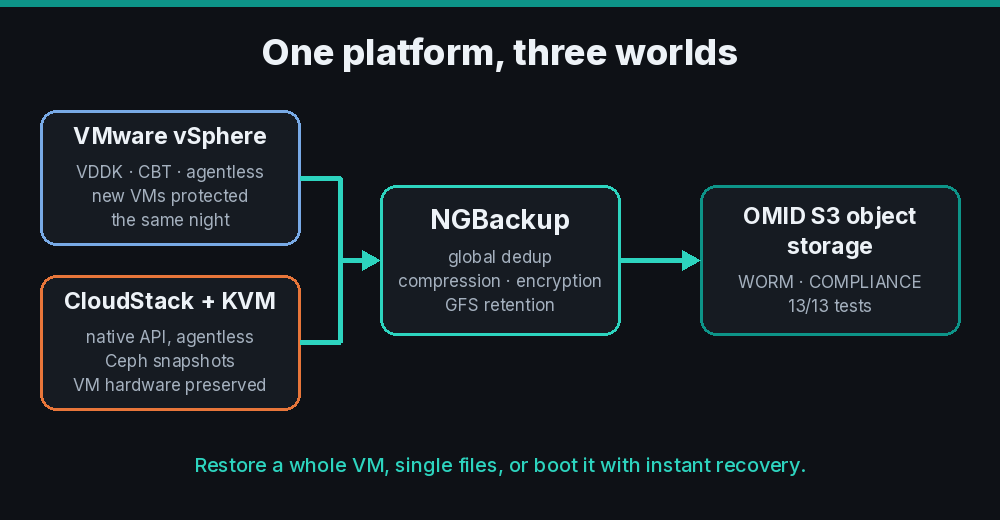
On vSphere, NGBackup works agentless through VDDK with Changed Block Tracking. Each job takes a snapshot, reads only the blocks that changed since the last backup and removes the snapshot at the end, even if the job is cancelled halfway. Data goes through global deduplication, with the index on SSD, and LZ4 compression, which in practice cuts backups to about half their size. Retention is GFS: a differential every day, a full every week and a monthly full kept longer.
Automatic discovery changed the routine the most. Every day NGBackup queries vCenter and creates the job for each new VM, following rules defined per resource pool. A VM created in the morning is in that night's backup, and nobody had to open a ticket.
CloudStack and KVM
On OMID's cloud, the NGBackup CloudStack plugin uses the CloudStack API and reads disks from Ceph RBD snapshots. There is no agent in the VMs, and stopped VMs are covered too. On restore, the VM comes back with the same configuration: UEFI firmware with Secure Boot, disk controller, virtio devices, CPU and memory. In the validation test we restored a 128 GiB VM, compared it byte for byte with the original, and it booted normally.
Immutable copies on OMID's S3
We certified the NGBackup S3 driver on OMID's object storage and it passed all 13 tests. The one that matters most is immutability: with Object Lock in COMPLIANCE mode, we tried to delete and to overwrite a stored backup, and the storage itself refused both. We also set a lifecycle policy so the versioning that Object Lock requires does not make storage use grow unchecked. The details are in the certification article.
24x7 monitoring
OMID does not rely on the software alone. The NGBackup team watches the jobs 24 hours a day, with smart monitoring that flags anything out of the ordinary. A snapshot that was not removed, a new VM left without a job, storage running close to its limit: these are detected and fixed on the spot, usually before OMID's team notices. Nobody has to open a dashboard every morning to find out whether last night's backup ran.
Moving from VMware to KVM
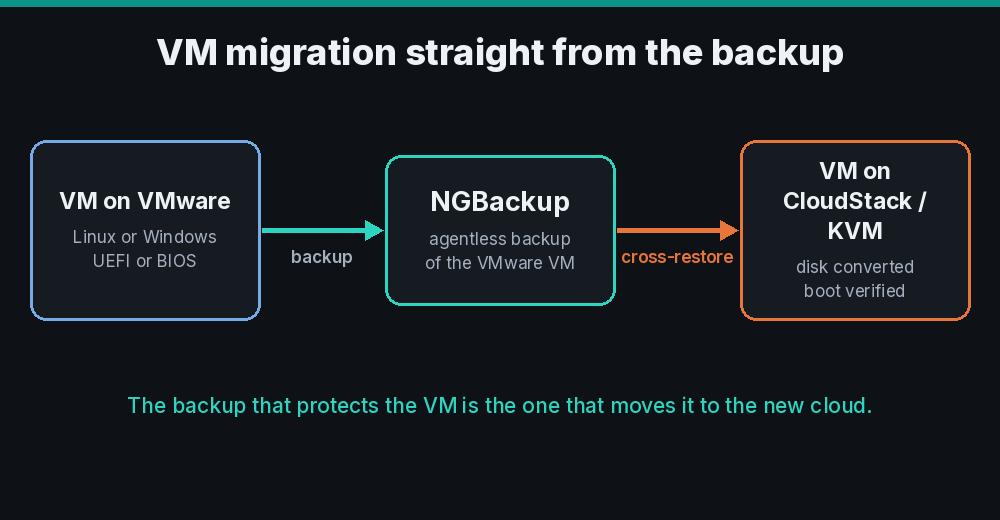
The fourth request was solved with cross-restore: the same backup that protects a VM on VMware is used to move it to KVM. The VM backed up from vSphere is restored straight into CloudStack. NGBackup converts the disk to the KVM format, creates the VM on OMID's cloud and checks that it boots.
We certified this path in August 2026. Since then it has been used to migrate production VMs (Linux and Windows, UEFI and BIOS, system and data disks) from a VMware environment hosted on a public cloud to OMID's cloud. All of them booted at the destination. For the end customer, migrating becomes a restore: no extra tool, no extra license, and a valid backup at every step.
Numbers
- More than 150 VMs protected and migrated across VMware, CloudStack and KVM, on the same platform.
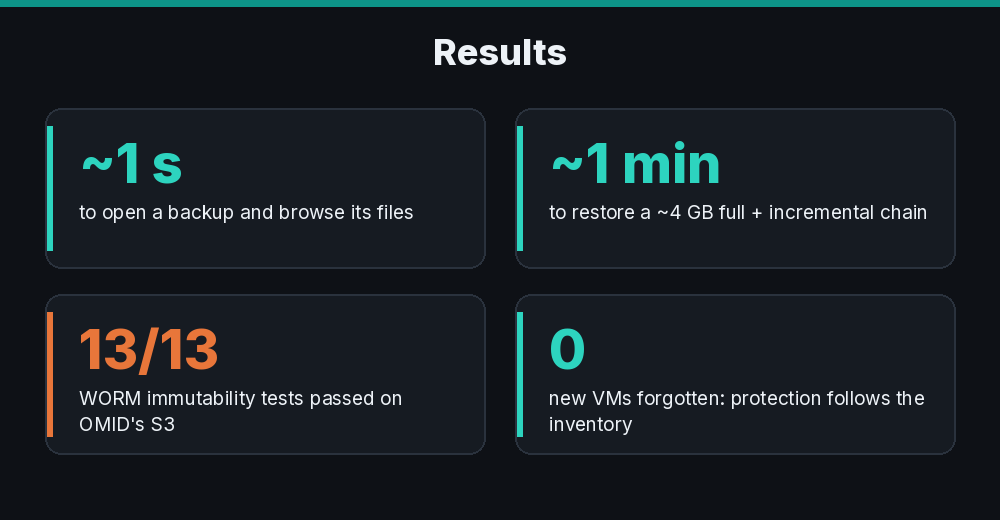
- About 1 second to open a backup and browse its files, and under a second to recover a single file. The index is built at the end of each job, with no manual step.
- About 1 minute to restore a VM from a full plus incremental chain of roughly 4 GB.
- New VMs join the backup on their own, because protection follows the vCenter inventory.
- 13 of 13 tests passed in the S3 certification, including the refusal to delete or overwrite locked copies.
How the project was run
The project was run jointly by OMID's team and NGStructures, the company that develops NGBackup. Several improvements came straight out of OMID's environment and now ship to every customer: hardware preservation when restoring CloudStack VMs, faster granular restore, and cross-restore from VMware to KVM.
Try it in your environment
You can start with the free Community edition, which protects up to 10 agents and 5 TB with no expiry date. Cloud providers and MSPs can sell backup as a service under their own brand through the white-label program. If you are planning to leave VMware, talk to our team.