Between June and July 2026 we tested NGBackup on a live Oracle Cloud Infrastructure tenancy. The native object storage driver was validated by Oracle. This page sums up what we tested, what the deployment looks like and the results.
Why a native driver
OCI offers an S3-compatible layer, and NGBackup works through it too. For the validation, though, we wrote a driver that speaks the OCI Object Storage API itself. The difference shows up where generic S3 falls short: choosing the storage tier for each upload, requesting the thaw of archived objects and checking the bucket's retention rules before writing.
Authentication uses an API signing key, the same mechanism as Oracle's CLI and SDKs. The driver is installed on the Storage Daemon host, and every setting can be edited from the NGBackup web console.
What the deployment looks like
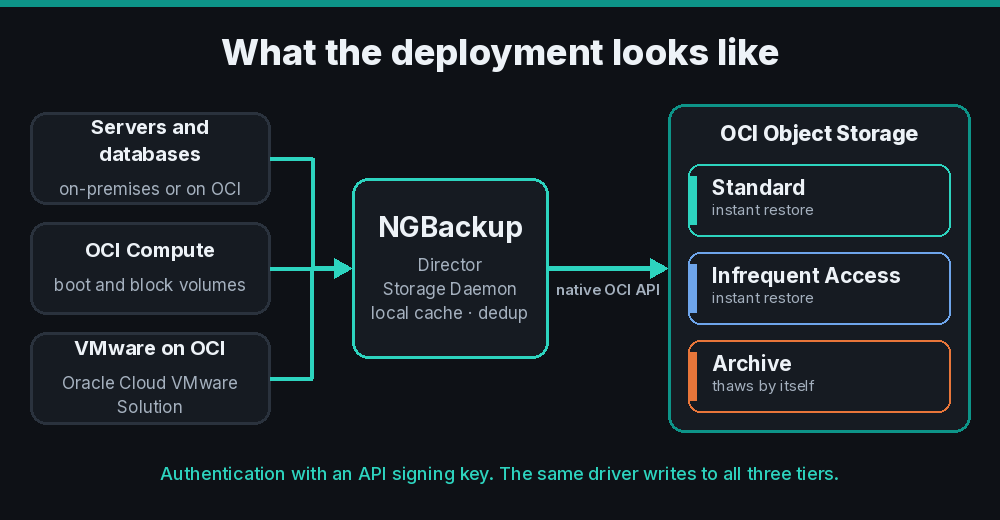
The Director coordinates the jobs. The Storage Daemon receives the data, deduplicates it, keeps a local cache and sends the volumes to the bucket. Sources can be servers and databases in your data center or on OCI itself, OCI Compute instances and VMware VMs on Oracle Cloud VMware Solution.
Example: NGBackup on an OCI Compute instance
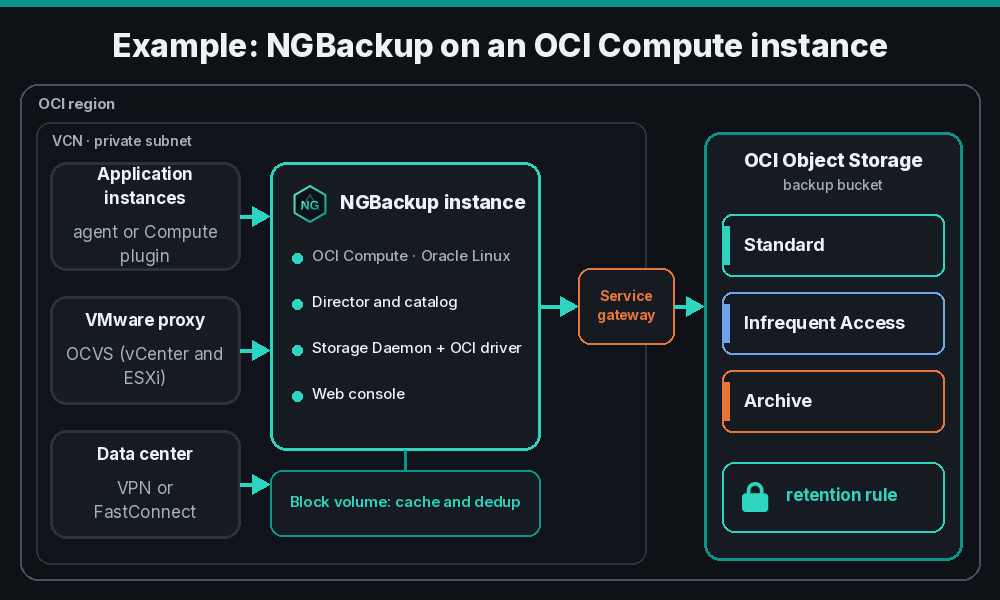
A simple design that fits most environments puts all of NGBackup on one OCI Compute instance running Oracle Linux. It runs the Director with the catalog, the Storage Daemon with the OCI driver and the web console. An attached block volume holds the local cache and the deduplication index. This is the layout we used for the OCI Compute plugin tests.
The instance sits on a private subnet of the VCN and reaches Object Storage through a service gateway, so backups never cross the internet. Application instances are protected by the NGBackup agent or by the OCI Compute plugin. VMware on Oracle Cloud VMware Solution comes in through a proxy VM on the SDDC network, and servers in your data center connect over Site-to-Site VPN or FastConnect.
On the bucket, a retention rule provides immutability and the storage tier sets the cost: Standard for recent backups and Archive for long retention. The checklist is short:
- An OCI Compute instance with Oracle Linux, sized for the amount of protected data.
- A block volume for the cache and the deduplication index.
- A service gateway on the VCN and network rules that let the sources in.
- An API user with access to the backup buckets only.
- The bucket with a retention rule in Governance or Compliance mode.
Standard, Infrequent Access and Archive
The storage tier is set in the configuration. Recent backups can go to Standard and long-retention ones to Archive, which costs much less. In our tests, restoring from Standard and Infrequent Access took about 0.1 second per object.
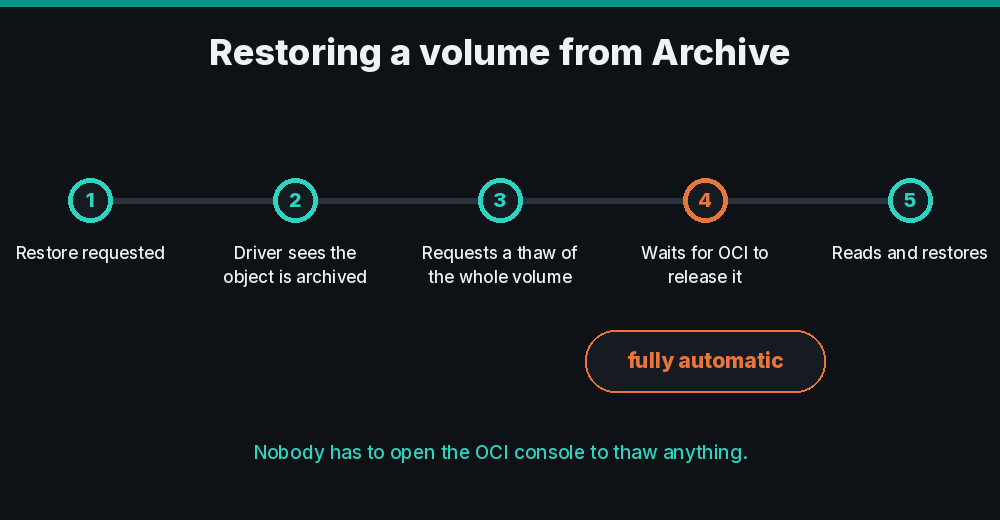
Archive is where many tools get complicated, because an object has to be thawed before it can be read. When a restore hits an archived part, the driver requests a thaw of every part of the volume at once, tracks the state and reads the data as soon as OCI releases it. It all happens with no manual step: nobody has to open the OCI console or watch the process.
We also ran the full path, from the Director to Archive and back: a file split into two parts, both frozen, restored with no manual step and with a SHA-256 hash identical to the original.
Immutability with retention rules
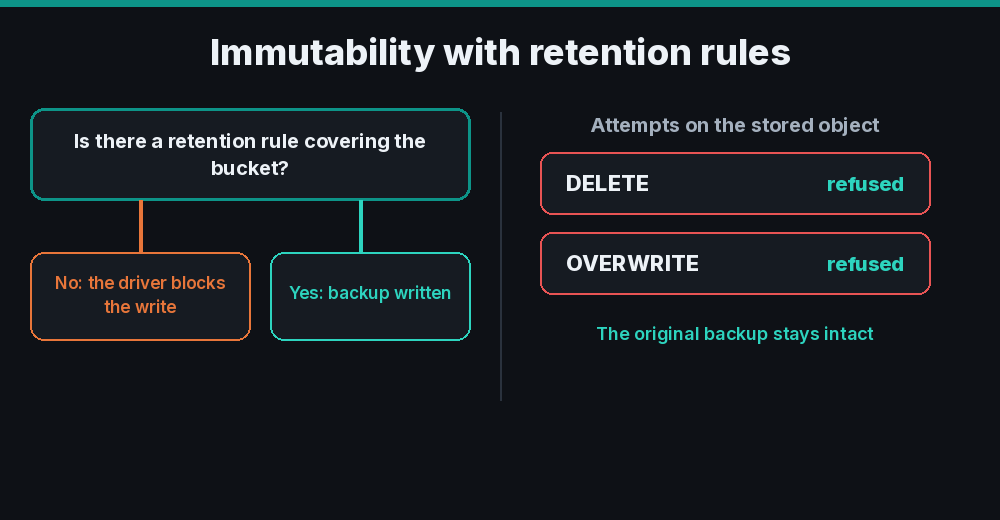
OCI has no per-object lock like S3. Immutability comes from retention rules on the bucket, and NGBackup handles it conservatively: with immutability on, the driver checks at connect time that a rule covers the configured retention period. If there is none, it does not write, so no backup is left unprotected by a configuration mistake.
There are two modes. In Governance, the rule can be changed by someone with administrative rights. In Compliance, the driver requires the rule to be locked, and only accepts it after the roughly 14-day grace period OCI gives before the lock takes effect. With the rule active, we tried to delete and to overwrite a stored backup. The storage itself refused both, and the original backup stayed intact.
OCI Compute plugin: instance backup
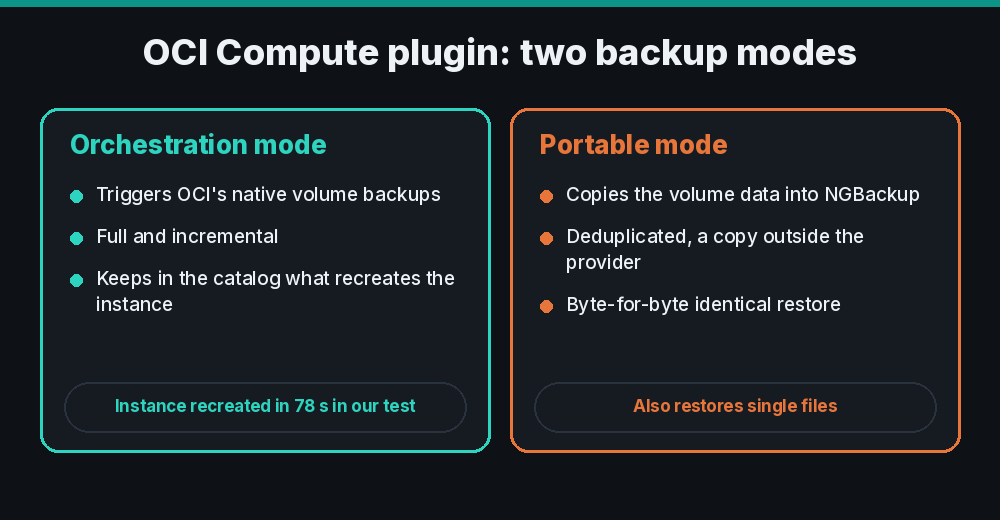
NGBackup has its own plugin for OCI Compute instances, and it works in two ways. In orchestration mode, NGBackup triggers OCI's own volume backups, full and incremental, and keeps in its catalog what it needs to recreate the instance. In our test, an instance with a 47 GB boot volume and a 50 GB block volume was recreated from the backup in 78 seconds, with data identical to the original.
In portable mode, the volume data leaves OCI and goes to NGBackup storage, deduplicated. This is the mode for anyone who wants a copy outside the provider. The restore came back byte-for-byte identical, and we recovered single files by mounting the restored image.
VMware on OCI
If you run VMware on Oracle Cloud VMware Solution, the NGBackup vSphere plugin works as it does with any vCenter: agentless, with quiesced snapshots. The NGBackup server needs to reach vCenter on port 443 and the ESXi hosts on 902, resolve the SDDC names through DNS and use an account with a backup role at datacenter level. We recommend a small Linux VM on the SDDC network acting as a proxy.
In a production project, the same path was used to move off VMware. VMs from Oracle Cloud VMware Solution were backed up by NGBackup and restored as KVM VMs on Apache CloudStack: Linux and Windows Server, UEFI and BIOS, system and data disks. All of them booted at the destination.
What we tested
| Test | Result |
|---|---|
| Bucket operations: write, read, list and delete | Passed |
| Backup and restore on all three storage tiers | Passed on all 3 |
| Restore from Archive with automatic thaw | Passed, fully automatic |
| Immutability: writes only with an active retention rule | Passed |
| Immutability: protection against delete and overwrite | Passed, backup intact |
| Full path: Director, Archive and restore | Passed, identical SHA-256 |
| OCI Compute plugin: recreate the instance from backup | Passed in 78 seconds |
| Driver unit tests | 25 of 25 passed |
Evaluating it in your environment
The driver configuration is in the NGBackup documentation. If you want to set up a test in your tenancy with our engineers, get in touch.